Skinfo Helping Users Find Skincare Products with Confidence
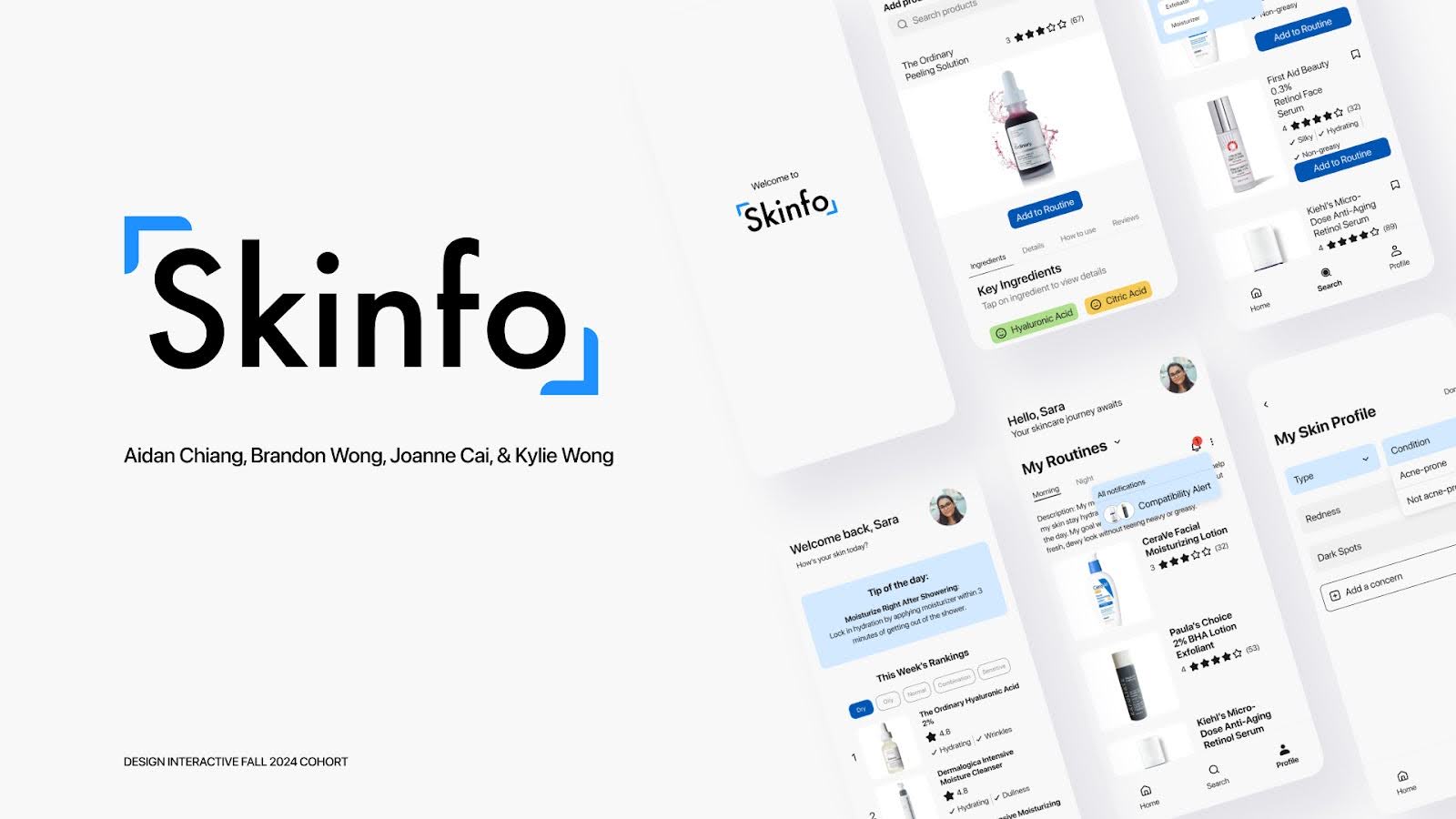
Skinfo is an educational skincare platform that empowers young adults to discover products suited to their skin type and understand skincare ingredients without bias or marketing noise.
My role:
UX Research Lead + Explore Page & Component Designer
Team
3 co-designers, 1 peer mentor
Timeline
6 weeks (Fall 2024)
Methods
Literature review, user surveys (50+ responses), user interviews (8 participants), competitive analysis
[IMPACT SUMMARY]
Led mixed-methods research across surveys, interviews, and competitive analysis that revealed key user pain points: difficulty accessing unbiased information, overwhelming product options, and unclear ingredient information.
Designed the explore and search experience, including the core info card component system that my teammates reused across the product (homepage recommendations, profile bookmarks, routine suggestions).
Made two strategic design decisions that enhanced personalization: adding skin type context to review profiles and surfacing informative materials in the search bar to increase educational value.


[OVERVIEW & CONTEXT]
The skincare market is overwhelming. Thousands of products exist, influencers promote contradictory advice, and ingredient lists are written in technical jargon. Young adults—especially first-time skincare buyers—struggle to:
Access unbiased information (most content online is marketing-driven or based on personal opinions)
Identify products suited to their specific skin type among endless options
Understand ingredients without a degree in chemistry
Build a personalized routine with confidence
Our challenge: Create a platform that educates without overwhelming, personalizes without presuming, and cuts through marketing noise.
[RESEARCH: UNDERSTANDING THE INFORMATION GAP]
As the research lead, I designed and executed a mixed-methods study to understand how young adults currently navigate skincare decisions and where they struggle.
Research approach:
Literature review – Established a foundation in existing skincare research and common consumer pain points.
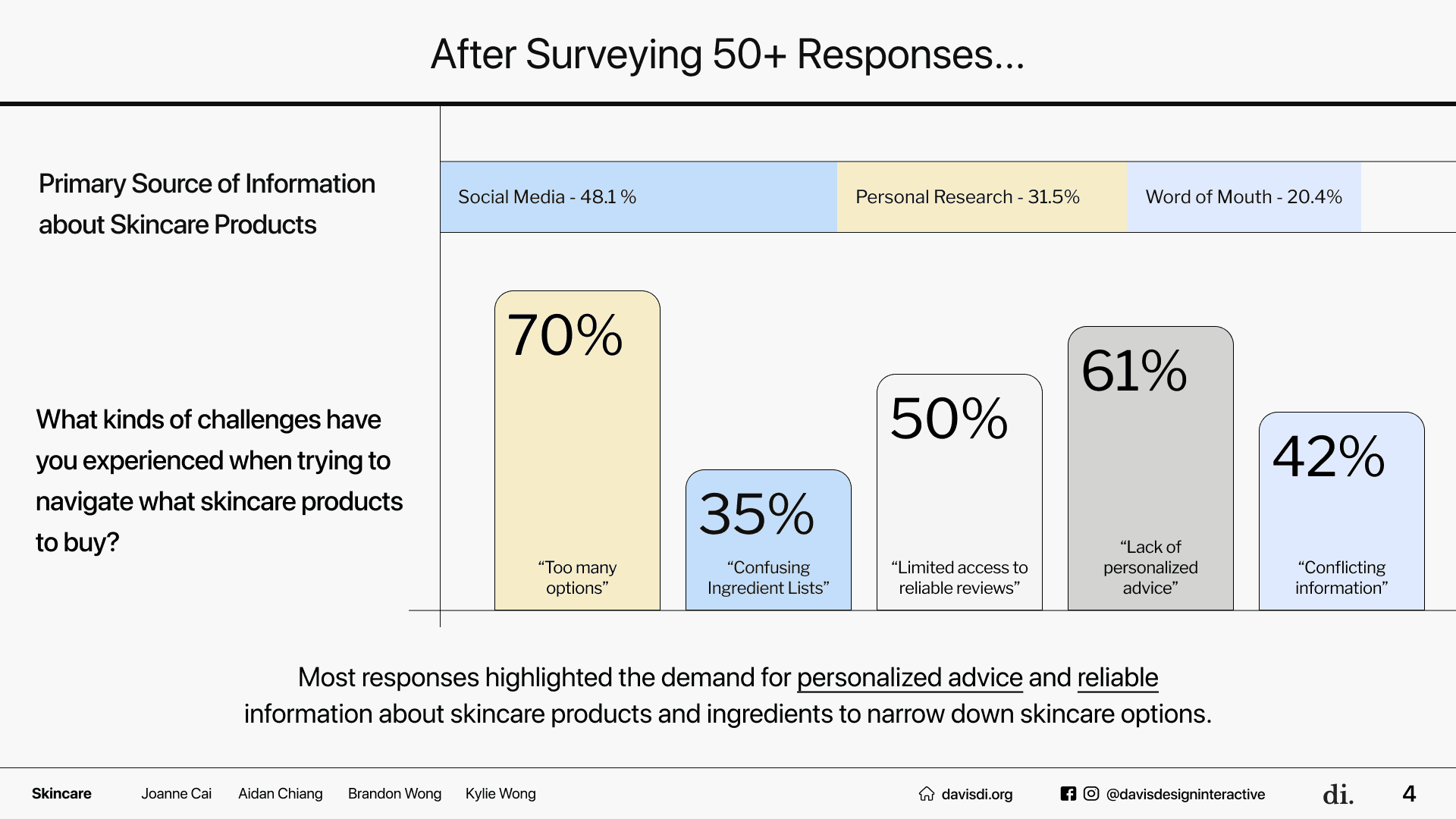
Survey – Distributed to 50+ young adult skincare users, asking about information sources, decision-making barriers, and product discovery pain points.
Key finding: Social media was the primary source of skincare advice, despite users recognizing it often spreads misinformation.
Users reported feeling overwhelmed by product options and unsure which products matched their skin type.
User interviews – Conducted 8 in-depth interviews with college students and recent graduates (ages 19–25) to understand their skincare journeys, frustrations, and what information would make them feel confident.
Key finding: Ingredient information was critical but inaccessible. Users wanted to know why a product was suitable for their skin, but existing product pages didn't explain ingredient effects.
Users mentioned wishing for peer reviews from people with similar skin types, not just overall ratings.
Competitive analysis – Reviewed platforms like OnSkin, Hwahae, Olive Young, and Ulta Beauty to identify how competitors addressed these gaps.
Finding: Most competitors were commerce-driven (selling products) rather than education-driven. This meant they prioritized sales over unbiased recommendations.
Opportunity: Skinfo could differentiate by being purely educational, building trust through transparency.
Research synthesis:
I synthesized these findings into three core design principles:
Unbiased information first. The platform should be an information hub, not a marketplace. This meant users wouldn't see "buy now" buttons, only educational content.
Personalization through data. By collecting skin type early (via an onboarding quiz), we could show personalized product rankings, ingredient suitability, and peer reviews from similar skin types.
Simplify complexity. Ingredient lists needed to be visual, categorized, and clickable—not a wall of technical text.
[DESIGN: EXPLORE PAGE & COMPONENT SYSTEM]
After the research phase, the team moved into ideation and prototyping. While my teammates led the synthesis and mid-fidelity phases, I focused on designing the explore page—the primary way users discover new products—and creating the reusable component system that would be used throughout the app.
Strategic Design Decisions
Decision 1: Skin type context in review profiles
Early in the explore page design, I realized that showing general product reviews wasn't enough. A 5-star review from someone with oily skin might not be relevant to a user with dry, sensitive skin. I proposed adding skin type tags to each review, so users could filter and read reviews from people with similar skin.
Why this matters: This small addition dramatically increased the personalization factor. Users could now see "4.8 stars from people with dry skin like mine" rather than just "4.8 stars overall."
Decision 2: Informative materials in the search bar
The explore page had a search feature, but I noticed it could be an educational tool, not just a lookup. I proposed adding suggested search prompts and ingredient tips in the search interface—e.g., "Search tip: 'Niacinamide helps reduce pore size'". This reduced the cognitive load of users who didn't know what to search for and educated them as they browsed.
Why this matters: Users often didn't know what ingredients to look for. By surfacing education at the point of search, we met them where they were.
Component System Design
To make sure the design system felt cohesive across the app, I created a set of foundational components that my teammates reused throughout the high-fidelity phase:
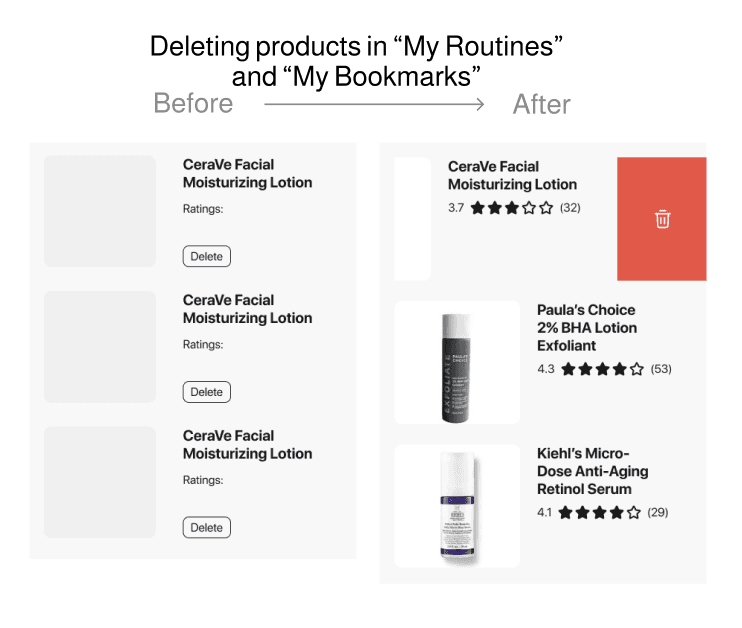
Product info card – Used on the homepage (recommendations), explore page (search results), profile page (bookmarks), and routines page (product selections). The card showed product name, skin type match, key ingredients, and price.
Ingredient tag system – Color-coded tags (green for "good," neutral for "ok," red for "poor" based on skin type) that appeared consistently across product pages and ingredient lists.
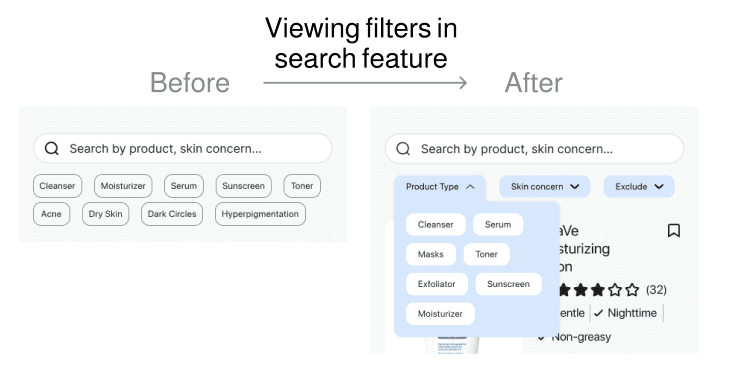
Filter button + dropdown system – Used in the search feature and product explore page, allowing users to narrow by product type, skin concern, and ingredient exclusions.
These components ensured consistency and saved the team time during the hi-fi phase—designers could apply the system rather than reinvent buttons and cards on each page.
Explore Page Evolution
Mid-fidelity iteration 1:
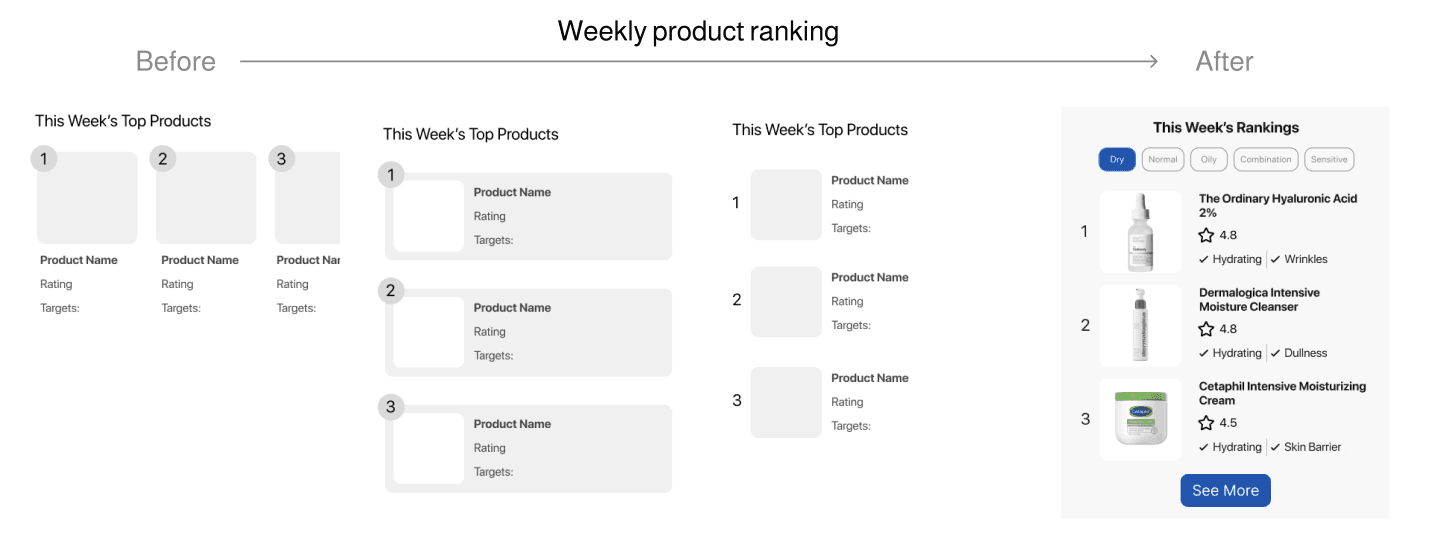
I created an explore page with a feed-style layout showing products based on the user's skin type, plus a search bar with basic filtering. Usability testing revealed that users wanted more control—they wanted to filter by specific concerns ("I want products for acne and dryness") and exclude certain ingredients.
Usability testing feedback:
Users found the initial filter structure confusing; they expected checkboxes, not dropdown selections.
The product card was too text-heavy; users skimmed and missed key information.
Mid-fidelity iteration 2:
I restructured the explore page with clearer filter organization (categories in dropdowns, checkboxes for multiple selections) and simplified the product card to highlight only the most critical information (name, skin match, key ingredients, rating from similar skin types).
Final design (hi-fi):
The explore page featured a clean search interface with suggested prompts, filtered product results organized by relevance to the user's skin type, and product cards that prominently displayed ingredient information and skin-type-specific reviews.
Keeping the team aligned as designs evolved: With each quarter came new iterations—routes were removed, dashboard layouts were reorganized, and categorization logic shifted. By mid-Winter, the team needed a single source of truth for how a student's lost-item journey unfolded. I created a comprehensive user flow diagram mapping every step from app entry through item claim, which became our north star for both design and development. This artifact clarified decision points (e.g., "Does the filter happen on the home page or in the report flow?") and prevented rework down the line.

[USER TESTING & ITERATION]
As the research lead, I also facilitated the usability testing sessions with my co-designer Joanne. We tested the explore and search features with 8 users in two rounds, asking them to:
Search for a specific product
Filter by skin concern and ingredient
View product information and reviews
Identify which products would work for their routine
Round 1 feedback (addressed in iteration 2):
Filter organization was unclear; users expected more intuitive grouping
Product cards had too much information; users wanted the most relevant details first
Search bar felt generic; users wanted guidance on what to search for
Round 2 feedback:
Users appreciated the simplified product cards and clearer filters
The skin-type-specific review tags were highly valued
A/B testing confirmed that the dropdown organization and ingredient tag system performed better than alternatives
[OUTCOMES & KEY LEARNINGS]
What we shipped:
Skinfo was a completed Figma prototype, with a comprehensive explore page, search functionality, product database with ingredient breakdowns, and a personalized onboarding quiz. The component system I designed became the foundation for the entire product, ensuring visual and interaction consistency.
On presentation day, our team of four delivered a ten-minute presentation to a panel of three judges: Cheryl Cai, Noelle Skransky, and Ken Skistmas. We walked them through our comprehensive design journey, sharing the insights and process behind Skinfo. Noelle provided particularly valuable feedback. She praised our product compatibility feature and appreciated how we consistently grounded our design decisions in thorough research. The primary constructive criticism focused on our presentation approach—specifically, recommending that we separate our mid-fidelity iterations into individual slides to allow for more focused discussion of each design frame.
What I learned:
1. Initial research informs, but doesn't dictate. My research findings created a north star (unbiased information, personalization, simplification), but the actual design required iteration. Users told us they wanted skin-type-specific reviews; I had to design the interface to make that data feel natural and accessible.
2. Component design is a design decision, not a chore. By creating reusable components early, I accelerated the team's ability to move through hi-fi iteration. This taught me that thinking systematically about patterns saves time downstream and improves consistency.
What's on the roadmap:
In-app skin scanner – Automatically analyze skin type via phone camera rather than relying solely on quiz answers
Q&A feature – Peer-to-peer question answering about products and ingredients
Enhanced community reviews – Structured review templates to ensure trustworthy, detailed feedback
CONCLUSION
This was my first time leading a research phase on a substantial project. I learned that research isn't just about data collection—it's about synthesis, storytelling, and creating a shared understanding with the design team. My job wasn't to hand off a report and disappear; it was to deeply understand the problem so I could guide the team's design decisions even after my "sprint" ended.
I also gained confidence in component-driven design thinking. By treating the product card, ingredient tag, and filter system as foundational pieces, I helped the team work more efficiently and coherently.
Finally, this project reinforced that collaboration across sprints matters. Even though I "led" research, I contributed to design critiques, tested prototypes, and shaped the visual direction. The sprint structure was useful for staying organized, but the best work happened at the intersections—research informing design, design questions sending the team back to research insights.